How to play K.O.R.E. in your browser
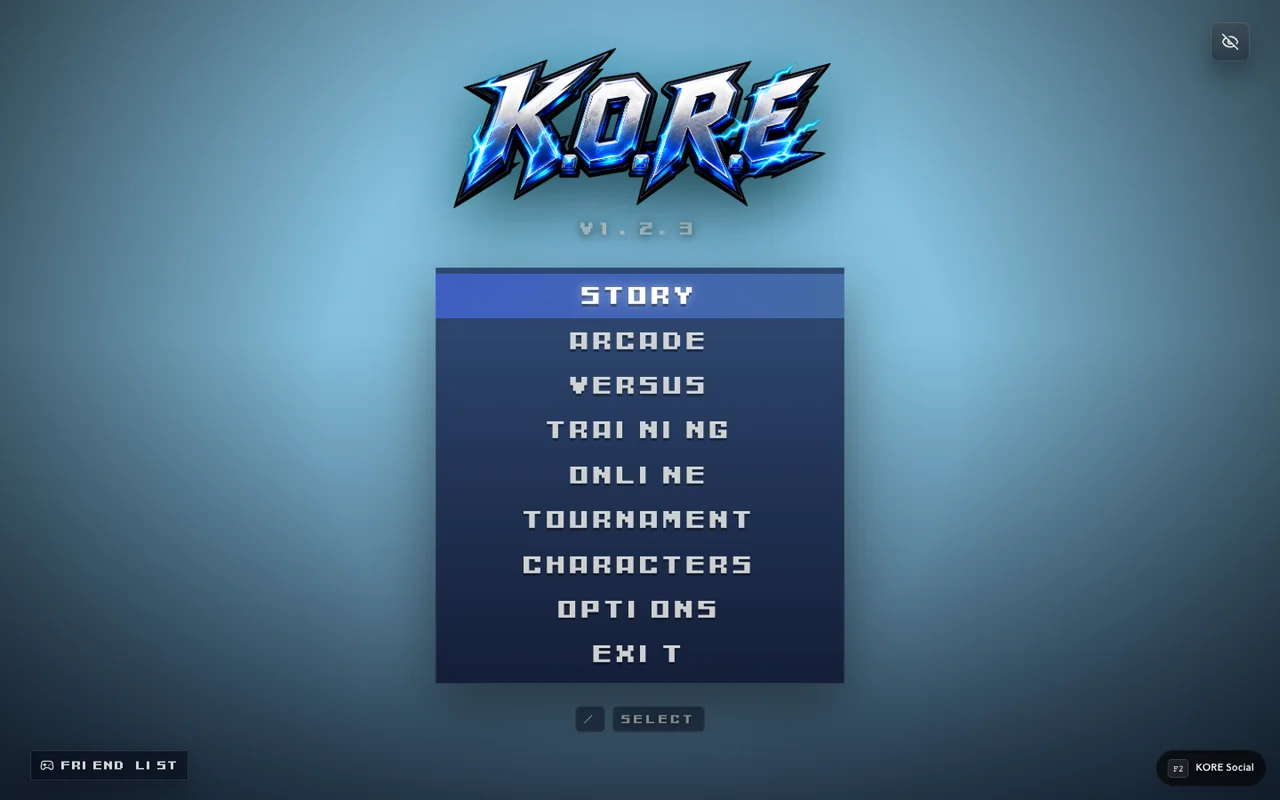
Open K.O.R.E. on PlayKORE, pass the initial key prompt, choose a mode and select a fighter. Browser play is separate from installing the desktop package or using development import tools.
Open the current game directly
Use Play K.O.R.E. for the playable browser release. The game information page explains the features and links to guides; the play page opens the actual game. You do not need a desktop installer just to try the browser route.
Let startup finish and give the page input focus. The inspected live startup shows a PRESS ANY KEY prompt. Use a deliberate fresh key or the displayed controller input, then inspect the mode choices rather than holding a button through several screens.
Choose a simple first session
Start with a mode where you can learn one fighter without the additional uncertainty of an online opponent. Training is useful for observing movement and attacks. Select an available fighter, complete the required selection flow and wait for the scene to finish loading before treating an absent animation as an input problem.
A useful first routine is movement, one attack, recovery and pause. Only after that should you try a command sequence or a longer combo. See beginner combat for a small practice plan.
Browser play is a delivery method
The game uses browser resources and downloaded assets during play. “No desktop installer required” does not mean no network transfer, no local settings or universal compatibility with every browser and device. Initial loading and steady-state performance are different measurements.
Keep a normal browser profile when you want local settings and progress to persist. Private browsing or cleared site storage can behave differently. Account and online features also have their own connection state; reaching the menu is not proof that a remote room has connected.
If you cannot reach a match
- Confirm you opened the actual /play/kore/ route.
- Wait for the initial prompt and use one fresh confirm input.
- Check the current screen's selection requirements.
- Try the game's controls/settings before assuming a familiar key is bound.
- Read visible asset or network errors before reloading.
If a session repeatedly fails at the same point, note the browser, device, mode and message. That is more actionable than reporting only that the page is slow.
When an installer makes sense
A desktop package or Steam Deck setup can be useful for a different launch workflow, but it is a separate path with its own requirements. Use the Steam Deck guide for that distinction. Importing custom content is also separate: the compatibility guide explains the development-only endpoints found in the source.
Sources & verification
View the research record
Coverage: Named source passages inspected; practical routines are original advice. Production entry and selected source comparisons are recorded separately. No whole-roster, full-campaign, physical-device or universal network certification.
First-party facts: Named runtime/source passages and the selected live entry checks recorded here. Original additions: Explanations, comparison framing and practice routines. Gaps: No full-campaign, whole-roster, universal device or network certification. Development tooling is distinct from public capabilities.
Source review: October 20, 2026. Public claims remain bounded by the scope of each source.
- kore app
Inspected menu, mode and importer source. Character import and MUGEN stage import POST to /__kore/dev/ endpoints. Source inspection is not a complete production compatibility test.
Inspected named local source passages and public response; bounded coverage below.
Inspected source fingerprint:
c91886ba1e3ebc951e3c3ef50356cfe64fb2718164bdccf7ea59d636960160ae. Public response fingerprint:38cc2f2a18a415a64a9cea8d0af2880043ff8c826d00f37d973b5f28e0f80d9d. Local source and public response differ or are different representations; no complete build equivalence is claimed.- kore controls
Default P1 WASD, U/I/J/K, Space, O, Enter, Escape. Saved settings override defaults.
Inspected named local source passages and public response; bounded coverage below.
Inspected source fingerprint:
a43e1af0089e4842e93e70366e9bacf900676cca35043247914f50f198224d7f. Public response fingerprint:38cc2f2a18a415a64a9cea8d0af2880043ff8c826d00f37d973b5f28e0f80d9d. Local source and public response differ or are different representations; no complete build equivalence is claimed.
Article fingerprint: b5a8a6e5ba684d98b5b17d3990865233babf4e99879255578f85b7722b2736b1.